
How to Fix E2 and E3 Error Codes on Your Icetubs Engine
When your Icetubs Engine displays an E2 or E3 error code, it often indicates high water temperature or overheating conditions. This can happen due to weather, placement, or airflow issues. Here’s how to quickly troubleshoot and restore your Icetub to perfect working order.
Step-by-Step Instructions to Address E2 & E3 Errors
1. Power Down the Engine
First, turn off your Icetubs Engine immediately. Running the system while it is overheated puts unnecessary strain on the compressor.
2. Drain the Water
Fully drain your Icetub. This removes any overly hot water that could be affecting system performance.
3. Move to a Cooler Environment
Relocate your Icetub and Engine:
-
Move indoors if possible.
-
Alternatively, move to a shaded outdoor area.
-
Ensure that the fan side of the engine has enough open space to properly vent warm air.
4. Refill with Room-Temperature Water
Refill the tub with room-temperature water (not ice-cold, and not warm from a hose sitting in the sun). Cooler water will allow the engine to stabilize and cool more efficiently.
5. Flush the engine
Before attaching the filter, guide a water flow into the upper water connection. Flush the water through the engine until it returns into the bath through the lower water connection. This ensures no debris is stuck in the pump.
6. Restart the Engine
After refilling, power your engine back on. The filter should be in place again. Monitor the system closely over the next hour to confirm that the error clears.
Check the Engine Fan: Is Dust Buildup Blocking Airflow?
A clogged fan is another common cause of cooling problems. Dust and debris can reduce airflow, leading to overheating.
Here’s what to look for:
| Before Cleaning | After Cleaning |
|---|---|
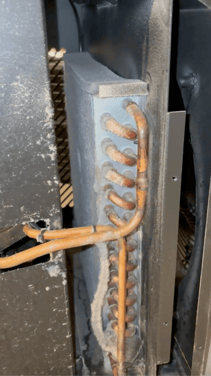 |
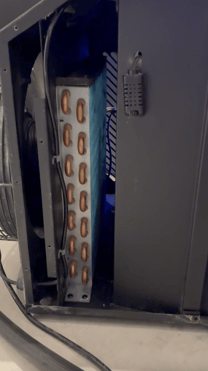 |
DIY Cleaning:
-
Remove the side panels carefully.
-
Clear out dust or debris blocking the fan.
💬 Need Help?
If you run into any questions during setup, don’t sweat it — we’re here to help!
Send us a message here: Icetubs Service & Maintenance