
🚨 Understanding the Issue
If your Icetubs Engine isn’t cooling as expected and the water stays above 10°C, the problem is often linked to the environment or restricted airflow.
Before looking into advanced solutions, try these simple steps to restore cooling performance.
Note: Make sure your engine is set to the Automatic mode or Cooling mode when trying to cool down the water. To heat up the water use Automatic mode or Heating mode.
🔧 Step-by-Step: How to Fix It
✅ Step 1: Check the Environment
-
Place the engine in a well-ventilated, shaded area.
-
The surrounding temperature should be between 15 and 20°C.
-
Avoid placing the engine in a corner or against a wall. It needs 50cm of space on all sides for heat to escape.
✅ Step 2: Let the Engine Rest
-
Turn off the engine for at least 4 hours.
-
Restart it later in the day when it’s cooler, such as during the evening.
-
Check the water temperature the next morning to see if it has improved.
✅ Step 3: Inspect and Clean the Cooling Fan
Dust can build up on the fan over time, which restricts airflow and may trigger error codes like E2, E3 or E4.
| Before Cleaning | After Cleaning |
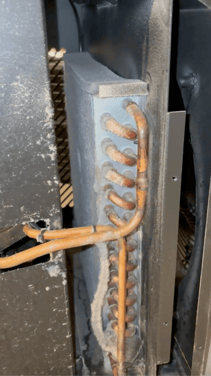 |
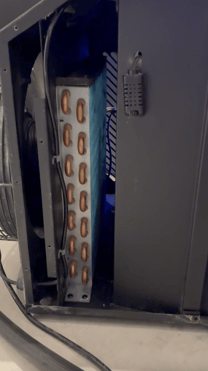 |
🧼 Cleaning Options
Clean it yourself
Remove the side panels and gently remove dust from around the fan using a soft brush or cloth. Another option is moving to the side the front fan grille
📹 Still No Cooling?
If the water is not cooling down after trying the steps above:
-
Record a short video showing the engine
-
Include any error codes on the screen
-
Show the setup and surrounding space
- Write down the Engine's ID and Barcode
Send the video to our support team so we can guide you further.
🛠️ Error Codes to Watch For
-
E2 indicates restricted airflow near the fan
-
E3 relates to high internal temperature or warm surroundings
- E4 relates to system high pressure fault (insufficient cooling, air flow, hot environment)
📩 Contact Support
Need help? 👉 Reach out to the Icetubs Service Team
We’re here to help get your cold back.